WordPress Media Offloader

Offload media. Cut hosting costs. Serve Fast Instantly. Free up disk space. Scale without limits.

OffloadX automatically moves your WordPress media to Cloudflare R2, Amazon S3, Bunny Storage and more — slashing server costs and serving files from the edge at full speed.
0
active sites
0
files offloaded
0
average rating
OffloadX Dashboard UI
yoursite.com/wp-admin/admin.php?page=cmo-settings
Dashboard Media offload overview
0 Total Media
75% on CDN
0 On Cloudflare R2 75% CDN coverage
0 Pending Run migration
0 Local Copies Still on server
2,480 files not yet offloaded Run Bulk Migration to push them to Cloudflare R2.
Quick Actions

Recent Media

Open Media Library →
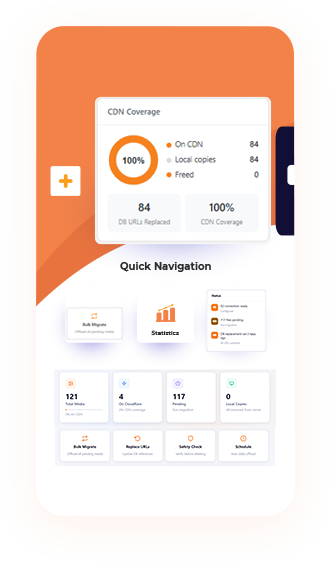
CDN Coverage
75%
On CDN7,520
Local6,120
Freed1,400
8,940DB Replaced
75%CDN Coverage
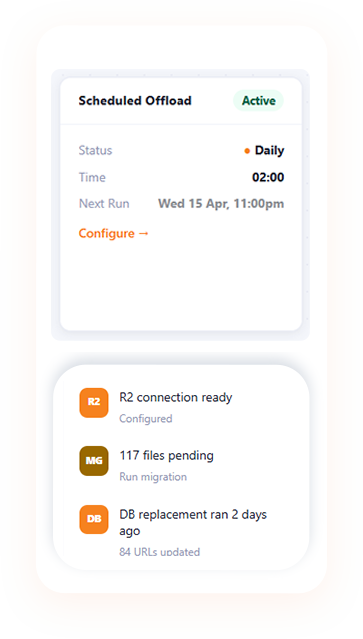
Scheduled Offload Active
Status Daily
Time03:00
Next RunThu 17 Apr, 3:00am
Configure →
Status
  • R2
    Cloudflare R2 readyConfigured ✓
  • MG
    2,480 files pendingRun migration
  • DB
    DB replacement ran 2h ago8,940 URLs updated
🚀 2,480 files waiting

Run the bulk migrator to upload pending media to Cloudflare R2.

Uploading hero-banner.jpg to R2…
Core features

Everything your site needs

One-click bulk migration

Move your entire media library to R2 in one run. Resumes if interrupted. Skips already-uploaded files automatically.

WebP auto-conversion

Every JPEG, PNG, and GIF converted to WebP before upload. Only uploads if WebP is smaller. PNG transparency preserved.

Instant URL rewriting

Rewrites URLs to your CDN. Works with Elementor, Gutenberg, WooCommerce, API, and sitemaps.

Scheduled offload

Set a daily time and forget it. New uploads automatically offloaded. Email summary after each run.

Safety check & rollback

Verifies every file is accessible on CDN before deletion. One-click rollback restores all database URLs.

R2 site folder

Organise multiple client sites in one R2 bucket. Each site gets its own named folder — easy to browse in Cloudflare.

SIMPLE SETUP

Up And Running In 4 Steps

1
STEP 1

Connect R2

Enter your Cloudflare credentials and complete your bucket setup in minutes.

2
STEP 2

Run migration

Start the process and move files efficiently with automatic optimization.

3
STEP 3

Verify CDN

Confirm delivery is working properly before removing old local assets.

4
STEP 4

Done

Your media is now served globally with a faster and cleaner workflow.

OffloadX — Bulk Migration
yoursite.com/wp-admin/admin.php?page=cmo-settings&tab=migrate
Bulk Migration Upload all existing media to your storage provider
Migration complete — all 10,000 files are now on Cloudflare R2! Database URL replacement ran automatically. Run Safety Check to verify CDN, then delete local copies to free server space.
Bulk Migration Uploading all media to Cloudflare R2. Database URL replacement runs automatically on completion.
● Running
10,000Total files
0On CDN
10,000Remaining
0Local freed
Uploaded 0 of 10,000
0%
Turbo · 50 files/batch Calculating ETA… 2 lanes · Agency mode
Endpoint Security

Easy To Sign Up & Can Create

Account Yourself

Lorem ipsum dolor sit amet consectetuer adipiscing elit aenean
commodo ligula eget dolor aenean massa. Lorem ipsum dolor sit 
amet consectetuer adipiscing elit aenean.

Many More Great Features Are At Your 


Disposal All The Time!

User Management

User Management

Our Optimized Key Features

Process Saves Your Team

One-click bulk migration

Sequential, reliable upload one file at a time. Works on shared hosting. Resumes from where it left off if the page is closed. Registry prevents double uploads even across sessions.

WebP conversion & compression

JPEG, PNG, GIF (static), and BMP all converted to WebP before upload. Size check. PNG alpha transparency fully preserved. Animated GIFs kept as-is.

User Tracking

Receivable & Payables

Time Tracking

Stock Management

What Our Customers

Are Saying?

“Lorem ipsum dolor sit amet consectetu adipiscing elit aen commodo 
ligula eget dolor aenean massa. Lorem ipsum dolor sit amet Lorem 
ipsum dolor sit amet consectetu adipiscing elit aenean commodo 
ligula eget dolor aenean massa.

Jone Thomas

Spsum consectetuer

“Lorem ipsum dolor sit amet consectetu adipiscing elit aen commodo 
ligula eget dolor aenean massa. Lorem ipsum dolor sit amet Lorem 
ipsum dolor sit amet consectetu adipiscing elit aenean commodo 
ligula eget dolor aenean massa.

Alena Domez

Spsum consectetuer

Get Start Your Business With

Our SeesTek! Software

Lorem ipsum dolor sit amet consectetuer adipiscing elit aenean commodo ligula eget dolor aenean massa. 
Lorem ipsum dolor sit amet consectetuer adipiscing elit aenean.